
Table Styling
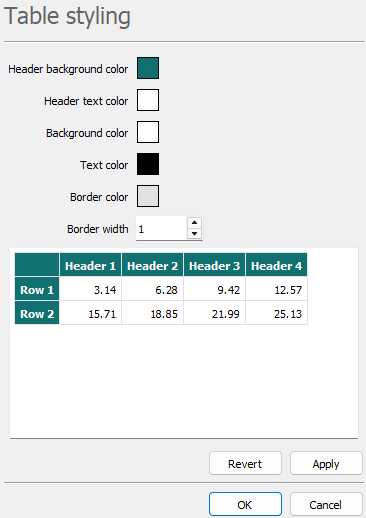
This section allows you to define the default display parameters used for tables displayed in Isatis.neo. These preferences apply globally to the entire application and are not specific to each individual projects.
These settings control the colors and borders used to render tables in the interface (for example statistics produced in the Messages window at the end of a run).
A preview area is available to visualize the appearance of the table according to the selected parameters.
- Header background color: Define the background color used for table headers. This color is applied to the header cells used to display column or row labels.
- Header text color: Define the text color used in table headers. Choose a color that provides sufficient contrast with the header background color to ensure good readability.
- Background color: Define the background color used for data cells in the table. This color is applied to all cells containing table values.
- Text color: Define the text color used in the table cells. This parameter controls the color of the values displayed in the table.
- Border color: Define the color used for the borders separating the table cells. Borders help visually separate rows and columns in the table.
- Border width: Define the thickness of the cell borders. Increasing this value makes the borders more visible and emphasizes the separation between cells.
